
If you run a domain that sends or receives important email - newsletters, password resets, invoices, legal docs - you must enable MTA-STS today.
MTA-STS (Mail Transfer Agent Strict Transport Security) forces sending servers to use TLS when delivering mail to your domain and prevents on-path downgrade + man-in-the-middle attacks - even when DANE isn’t available.
I've enabled it on osbornepro.com using nothing but Cloudflare Workers (free tier). Here’s exactly how I did it - and how you can too.
Why MTA-STS Matters
- STARTTLS is opportunistic → attackers can strip the flag and read your mail in plain text
- MTA-STS says: “Only accept mail over TLS from these MX hosts. If you can’t, drop it.”
- Google, Microsoft 365, ProtonMail, Fastmail, and most major providers already honor MTA-STS
- Works even without DNSSEC (though you should enable that too - it’s free on Cloudflare)
Why I Chose Cloudflare Workers (vs Traditional Hosting)
| Feature | Cloudflare Workers | Traditional VPS/Hosting |
|---|---|---|
Cost for /.well-known/mta-sts.txt | Free (100k req/day) | $5–15/month |
| Global edge delivery | 320+ cities | Single region |
| Automatic HTTPS + HSTS | Yes | You configure |
| DNSSEC | One-click, free | Depends on registrar |
| Internet traffic share | ~25% of all web requests | <0.1% |
Step-by-Step MTA-STS Setup
1. Cloudflare Worker Code
If you do not use Cloudflare, you do not need to create a Worker like I did.
You are able to simply add an "mta-sts.txt" file to your websites /.well-known URI path.
If you do use Cloudflare, the mta-sts.txt policy is served via a Cloudflare Worker that responds to requests for /.well-known/mta-sts.txt using a standard JavaScript event listener.
If you are familiar with AWS you could say Cloudflare Workers are similar to a Lambda.
In the example file below I included what your domains might be for ProtonMail, Gmail, and Outlook/Exchange.
Remove any of the mx entries that are not used in your domain or add any you use I did not include.
If you do not know what your MX records are you can discover them using the "dig" command line tool.
dig MX yourdomain.com +shortIf you are on Windows you can use the below PowerShell command:
Resolve-DnsQuery -Name yourdomain.com -Type MX | `
  Select-Object -ExpandProperty Data | `
  ForEach-Object -Process { $_.TrimEnd('.') } | `
  Sort-Object -Unique | `
ForEach-Object -Process { "mx: *.$_" }- Login to your Cloudflare Dashboard
- In your "Account Home" section go to the "Compute & AI" dropdown and click "Workers & Pages".

- In the top right of the webpage click the "Create Application" button.
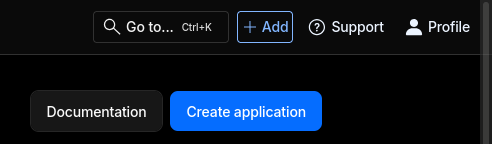
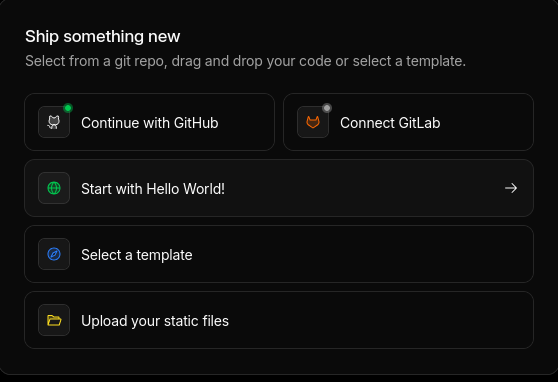
- Select the "Start with Hello World!" button.
- In the "Worker name" section use the value "mta-sts" as this is the required subdomain name for MTA-STS information.
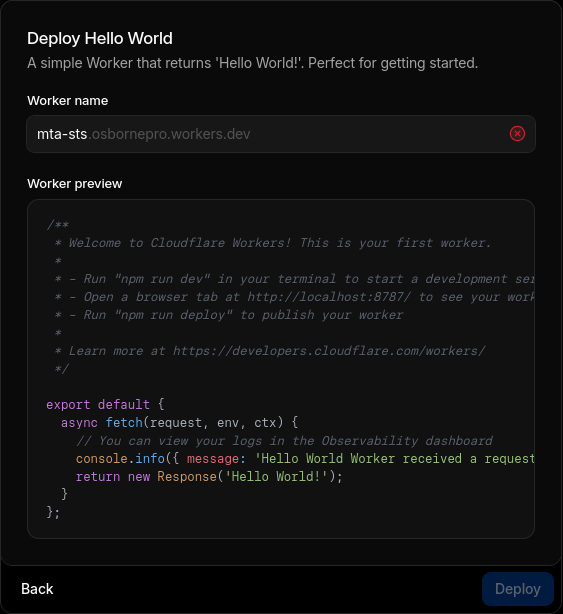
- In the "Worker preview" section paste in the Javascript code below replacing my domain information with yours.
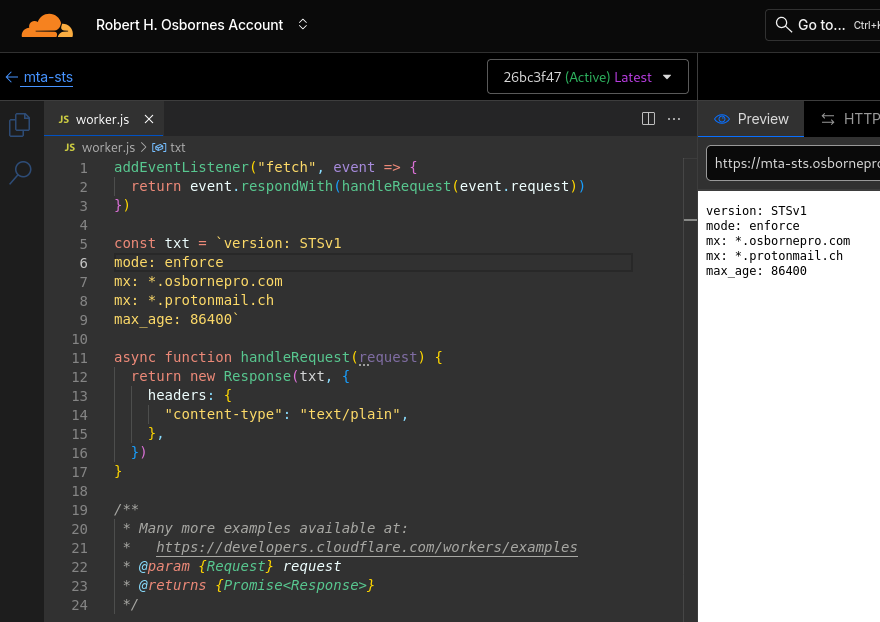
addEventListener("fetch", event => { event.respondWith(handleRequest(event.request)) }) const policy = `version: STSv1 mode: enforce mx: *.yourdomain.com mx: *.protonmail.ch mx: *.mail.protection.outlook.com mx: *.protection.outlook.com mx: gmail-smtp-in.l.google.com mx: *.google.com mx: *.googlemail.com max_age: 86400` async function handleRequest(request) { const url = new URL(request.url) if (url.pathname === "/.well-known/mta-sts.txt") { return new Response(policy, { status: 200, headers: { "content-type": "text/plain", "cache-control": "public, max-age=3600", }, }) } return new Response("Not Found", { status: 404 }) } - Click the "Deploy" button.


2. MTA-STS DNS Records
Now that your mta-sts.txt file exists in the required website location, you need to point to it using a DNS TXT record. The "id" value in the TXT record is most commonly set to the current date followed by a two digit number to represent versions if ever updated.
| Type | Name | Content | Proxy |
| TXT | _mta-sts.yourdomain.com | v=STSv1; id=2025112901; | DNS Only |
3. Enable DNSSEC
In Cloudflare DNSSEC can be enabled for your domain with a simple button click.
Go to:
Cloudflare Dashboard → click on "yourdomain.com" → in the DNS menu dropdown → click "Settings" → in the DNSSEC section → tick the option to "Enable DNSSEC"
Cloudflare will now automatically sign your DNS zone using a trusted certificate providing integrity. They will create and maintain DS records, enabling trusted, cryptographically verifiable name resolution for your domain.
4. Test It
The tests performed by the site resources above will now show yourdomain.com with valid, enforced MTA-STS policy.
5. Add TLS Reporting (TLS-RPT)
TLS Reporting (TLS-RPT) is the companion to MTA-STS that sends you daily reports whenever someone tries (and fails) to deliver email to your domain with proper TLS encryption. Every time a sending server encounters a problem delivering encrypted mail to you (certificate issue, no TLS support, policy violation, etc.), they can send a small JSON report to an email address or HTTPS endpoint you specify. You get a clear, aggregated report once per day showing:
- Who tried to send you mail without TLS
- Who had certificate errors
- Which of your MX records caused problems
- How many messages were affected
There are also benefits to you as the domain owner. If you ever accidentally break your MX or certificate, you’ll know within 24 hours why mail is bouncing. If a threat actor attempts to perform downgrade attacks by stripping STARTTLS, you will see large providers suddenly reporting “no TLS” failures. Auditors and security standards (like ISO 27001 or upcoming Google/Microsoft mandates) love these reports.
Create your TXT record:
_smtp._tls.yourdomain.com TXT "v=TLSRPTv1; rua=mailto:your-email@yourdomain.com"Final Checklist
- Domain on Cloudflare DNS
- DNSSEC enabled
- Worker deployed + route
mta-sts.yourdomain.com/.well-known/mta-sts.txt - TXT
_mta-stsrecord with currentid= - Tested and green
Total cost: $0.00/month
Conclusion
There’s no excuse not to have MTA-STS and TLS-RPT configured. This setup does not require a DMARC policy (which you also need to setup). It’s free to do, takes 5 minutes, and dramatically improves your email security.
Cloudflare makes it trivial - global edge, automatic HTTPS, free DNSSEC, and Workers that never go down.
Tags: MTA-STS, TLS-RPT, Email Security, Cloudflare, DNSSEC, TLS, SMTP, Cyber Defense
Published: November 29, 2025
Author: Robert H. Osborne
